> For the complete documentation index, see [llms.txt](https://knowledgebase.fabricdata.com/xytech/llms.txt). Markdown versions of documentation pages are available by appending `.md` to page URLs; this page is available as [Markdown](https://knowledgebase.fabricdata.com/xytech/rest-api/query-parameters-and-filters.md).

# Working with Query Parameters and Filters

### Query Parameter

**GET** and **PATCH** List endpoints require query parameters.

This section describes the syntax and options used for the query parameter. This is a mandatory parameter for List documents.

The standard format for a “query” parameter is to add the parameter as *query={}* to the end of a GET request for a List document after the parameter delimiter (“?”), where the value of query= is a JSON object:

`http://{APIbase_url}/documentList?query={key: value}`

Such as:

`http://{APIbase_url}/jmJobList?query={"job_no": "12345"}`

**Note:** The query parameter is supported with GET and PATCH requests of List type documents and is **not** supported by GET requests for Setup or Maintenance documents.

In the simplest form, the value is a single piece of information, such as a string or integer. In more complex forms, the value is a JSON object containing specific formats as described below.

See section regarding **URL encoding** requirements: [URL encoding of special characters](#url-encoding-of-special-characters)

### Query Filters

#### String or Number

To return items that match a specified string. The string can either be letters or numbers. Wildcard ‘%’ can be used. Remember to URL encode the % sign.

<table><thead><tr><th width="213">Description</th><th>Parameter values</th></tr></thead><tbody><tr><td>Syntax</td><td><code>query= {"field":"value"}</code></td></tr><tr><td>Examples</td><td><code>query={"job_desc":"Big Apple Live"}</code><br><code>query={"job_desc":"%Big%"}</code><br><code>query={"job_no":101101}</code></td></tr><tr><td>Multiple key/value pairs</td><td>To specify multiple key/value pairs, separate each key/value pair with a comma<br><code>query={"cust_id":"123","job_type_no":"4"}</code><br><code>query={"cust_id":"123","job_type_no":"4","active":"Y"}</code></td></tr><tr><td></td><td>Note: When specifying multiple key/value pairs, the API will return only items that match ALL specified criteria.</td></tr></tbody></table>

#### Range

To return items that fall between a specified minimum and maximum numeric value.

<table><thead><tr><th width="214">Description</th><th>Parameter values</th></tr></thead><tbody><tr><td>Syntax</td><td><br><code>query="field":{"$range":[lower_limit, upper_limit]}</code><br></td></tr><tr><td>Examples</td><td><p><br><code>query={"job_no":{"$range":[100, 199]}}</code></p><p><code>query={"wo_begin_dt":{"$range":["2023-12-01","2023-12-31"]}}</code>  </p><p><code>query={"wo_begin_dt":{"$range":["2023-06-01T09:00","2023-06-01T17:00"]}}</code></p></td></tr><tr><td></td><td></td></tr></tbody></table>

#### In

To return items that match one of the values provided in a given set of values. See section below on wildcards [Searching for multiple wildcard values](<#Searching for multiple wildcard values>)

<table><thead><tr><th width="212">Description</th><th>Parameter values</th></tr></thead><tbody><tr><td>Syntax</td><td><code>query={“field”:{"$in":[“value_1”,”value_2”, … ”value_n”]}}</code></td></tr><tr><td>Examples</td><td><code>query={“job_no”:{"$in":[100, 105, 110, 119]}}</code></td></tr></tbody></table>

#### Null (empty)

To return items that have NULL values. Note: Put pipe characters around NULL to differentiate it from the literal string “NULL”.

<table><thead><tr><th width="271">Description</th><th>Parameter Values</th></tr></thead><tbody><tr><td>Syntax</td><td><code>query={"field": "|NULL|"}</code></td></tr><tr><td>Examples</td><td><code>query={"phone_number":"|NULL|"}</code></td></tr></tbody></table>

#### NE (not equal)

To return items that do not match the specified number, string, or NULL.

<table><thead><tr><th width="266">Description</th><th>Parameter Values</th></tr></thead><tbody><tr><td>Syntax</td><td><code>query={"field":{"$ne":"value"}}</code></td></tr><tr><td>Examples:</td><td></td></tr><tr><td>Not string</td><td><code>query={"job_desc ":{"$ne":"Big Apple Live"}}</code></td></tr><tr><td>Not number</td><td><code>query={"cust_id":{"$ne":1001}}</code></td></tr><tr><td>Not null</td><td><code>query={"jm_phase_external_key":{"$ne":"|NULL|"}}</code></td></tr><tr><td>Not like</td><td><code>query={"wo_desc":{"$ne":"Test%"},"wo_type_no": 83}</code></td></tr></tbody></table>

#### Greater than and less than new query parameters

To return items where values are greater than or less than a given value.

<table><thead><tr><th width="195">Description</th><th width="73">Abv</th><th>Parameter values</th></tr></thead><tbody><tr><td>Syntax</td><td></td><td><code>query={"field":{"option": "value"}}</code></td></tr><tr><td>Examples:</td><td></td><td></td></tr><tr><td>Greater Than</td><td>$gt</td><td><code>query={"title_no":{"$gt": 106438}}</code></td></tr><tr><td>Greater Than Or Equal</td><td>$gte</td><td><code>query={"date_added":{"$gte":"2022-07-26T00:00:00"}}</code></td></tr><tr><td>Less Than</td><td>$lt</td><td><code>query={"date_added":{"$lt":"2022-07-26T00:00:00"}}</code></td></tr><tr><td>Less Than Or Equal</td><td>$lte</td><td><code>query={"date_added":{"$lte":"2022-07-26T00:00:00"}}</code></td></tr><tr><td></td><td></td><td>Values can be numeric or dates.</td></tr></tbody></table>

Full GET example for greater than

```json
curl --location --globoff 'http://{APIbaseURL}/LibMasterList?resultcolumns={"L": ["master_no", "master_desc", "date_added","desc_3"]}&query={"title_no":{"$gt": 1102}}' \
--header 'Content-Type: application/json' \
--header 'Authorization: Basic ******' \
--data ''
```

#### NOTIN (Not in)

(11.1) Ability to query where a field's value does not match an array of supplied values. \
Usage example:\
`{{server}}/PmProjectList?query={"project_desc":{"$notin":["test", "Sarah"]}}` \
Applies to GET queries.

#### LIKEAND (Like and)

(11.1) Ability to define an array of matching values that all have to match regardless of the order defined. `{{server}}/LibMasterList?{"master_desc":{"$LIKEAND":["%Genesis%","%XHD%"]}` \
Applies to GET queries.

### Query Filter Tips

#### NULL Values

The Null parameter returns any record that has a null value for the specified key, which indicates that no value has ever been set. This differentiates it from an empty string for text-based or date-based properties, a 0 value for numbers, and true or false values for Boolean properties.

**Note:** Not all fields support null values. If possible, check the OpenAPI definition whether the field allows nulls.

**Values**

* String values are not case-sensitive.
* DateTime values should be provided in a valid ISO date format.

#### URL encoding of special characters

When using HTML special characters as part of the query value, they must be URL encoded.

Example:  to use a wildcard query such as "**%dave%"**, the % needs substituting with **%25**.  Once URL encoded will look like this **%25dave%25**

Example GET query with URL encoded wildcard :\
`{{server}}/MoMediaOrderList?query={"wo_desc":"`**`%25dave%25`**`"}&resultcolumns={"L": ["wo_no", "wo_desc"]}`

*(The reason why **%dave%** fails to return valid results it that **%da** is the encoding for the **Ú** character)*

This also applies to datetime values that use the offset attribute with the + sign.

To include a value of "**2023-06-01T09:00+5:00**" in a URL query parameter, substitute + with **%2b**

Example:\
&#x20;`query={"wo_begin_dt":{"$range":["2023-06-01T09:00%2b5:00","2023-06-01T17:00%2b5:00"]}}`

#### Searching for multiple wildcard values

If you wanted to search for multiple wildcard values contained within a single field that all need to exist, then you can include a list of wildcard values.

For example, if you wanted to search for media assets that have "Tale" AND "Dark" in their "master\_desc" field, you can use the following query parameter:

`{"master_desc":{$in:["%Tale%Dark%","%Tale%Dark%"]}}`

Note you may need to use encode the % symbol (for instance if using Postman) you will need:

`{"master_desc":{$in:["%25Tale%25Dark%25","%25Tale%25Dark%25"]}}`

### Result Columns Parameter

Used by the **GET** method on List and Maintenance endpoints.

**resultColumns** parameter is used to define the fields you wish to return in the response.\
Without this parameter, the response will contain all document fields which is not recommended for performance reasons.

*For example:*\
`{APIbaseurl}/JmJobList?Query={"job_no":2}&resultColumns={"L":["job_no","job_desc"]}`

Job No. and Job Description fields will be included in the response.\
Important to include the “L” as the top-level element.

**Sub-Table columns**

Many endpoints include related sub-tables in their responses. Example syntax to include specific sub-table columns.

Below example fetches a transmission order description and all it's service row numbers:

`{APIbase_url}/XmTransmissionOrder/wo_no_seq=7655-1?resultColumns={"jm_work_order":["wo_desc"],"mo_service_row":["service_row_no"]}`

*Response:*

```json
{
    "jm_work_order": [
        {
            "mo_service_row": [
                {
                    "service_row_no": {
                        "external_key": null,
                        "service_row_no": 9933
                    }
                },
                {
                    "service_row_no": {
                        "external_key": null,
                        "service_row_no": 9934
                    }
                }
            ],
            "wo_desc": "WS Transmission Test"
        }
    ]
}
```

{% hint style="success" %}
**Performance recommendation.**\
Always use the **resultColumns** parameter otherwise responses will return large numbers of fields most of which will not be required and only adds to the system performance overhead. \
In the future API v3, this will become a mandatory parameter.
{% endhint %}

### Pagination and Sort Parameters

API Pagination is available for the GET Query on List endpoints.

<table><thead><tr><th width="129">Parameter</th><th width="112">Type</th><th>Description</th></tr></thead><tbody><tr><td>pageSize</td><td>Integer</td><td>is the number of records returned per page</td></tr><tr><td>page</td><td>Integer</td><td>is the page number to return</td></tr><tr><td>sort</td><td>String</td><td>is the field to sort followed by ascending or descending option</td></tr></tbody></table>

**Sort parameters:**\
Syntax: `sort=[field1 sort, field2 sort]`\
Example: `sort=["job_desc desc", "job_no desc"]`

*Note:*\
If you don’t specify pageSize, the ‘page’ and ‘sort’ options are ignored.\
If you do specify a pageSize and do not pass a page, page will default to 1.

**Example:**\
To return the first 10 records on page 1 sorted by product\_no:

```json
GET {APIbaseURL}/JmOrgProductList?query={"active":"Y"}&resultColumns={"L":["product_no","product_desc"]}&sort=["product_no desc"]&pageSize=10&page=1
```

**Full example:**

```json
GET {APIbaseURL}/JmJobList?query={"job_no":{"$range":[1,67982]}}&resultcolumns={"L": ["job_no", "job_desc"]}&pageSize=5&page=7&sort=["job_desc desc", "job_no desc"]
```

The above example queries for jobs that have job numbers in the range of 1 to 67982, returns job number and job description fields but only the 7th page with 5 jobs sorted first by description (descending) then by job number (descending).

The response header will include a parameter called '**Pagination-Count**' which is the count of all records as a result of the query.

This will allows you to call for data in manageable payloads without exceeding memory limitations.

### Null Value Handling Parameter

This optional parameter suppresses all null value fields from the response payload. Using this parameter reduces the payload size dramatically, especially for larger queries. (v10.6+)

Applicable for all GET calls with List, Maintenance & Report endpoints.\
Values are ‘**ignore**’ or ‘**include**’ (default).\
'include' means that all null values are included in the response.

Examples: \
\&#xNAN;*URL Parameter:- nullvaluehandling=**include** (default)*&#x20;

```js
{
    "L": [
        {
            "barcode": "MM915",
            "company_name": null,
            "cust_id": null,
            "master_desc": null,
            "master_no": {
                "barcode": "MM915",
                "external_key": "VX-90",
                "master_no": 915,
                "umid": null
...
```

URL Parameter:- nullvaluehandling=**ignore** (recommended)

```js
{
    "L": [
        {
            "barcode": "MM915",
            "master_no": {
                "barcode": "MM915",
                "external_key": "VX-90",
                "master_no": 915
...
```

Notice how all null value fields are omitted.

{% hint style="success" %}
**Performance Recommendation**\
It's recommended to always include this parameter with the value 'ignore', unless visibility of null values is required.
{% endhint %}

### Alternate Key Handling Parameter

This optional parameter suppresses additional key fields from the responses. If you do not need to work with key fields other than the primary key, use this parameter to keep the API call performant and reduce the processing overhead when not working with alternate key fields. (v10.6+)

Applicable for all GET calls with List, Maintenance endpoints.

Values are ‘**ignore**’ or ‘**include**’ (default). ‘include’ includes alternate keys in the response.

Example: \
URL Parameter:- alternatekeyhandling=**include** (default)

```json
{
    "L": [
        {
            "barcode": "MM915",
            "company_name": null,
            "cust_id": null,
            "master_desc": null,
            "master_no": {
                "barcode": "MM915",
                "external_key": "VX-90",
                "master_no": 915,
                "umid": null
...
```

*URL Parameter:- alternatekeyhandling=**ignore*** (recomended)

```json
{
    "L": [
        {
            "barcode": "MM915",
            "company_name": null,
            "cust_id": null,
            "master_desc": null,
            "master_no": {
                "master_no": 915
...
```

Notice how the additional key fields barcode, external\_key & umid are omitted.

{% hint style="success" %}
**Performance Recommendation**\
It's recommended to always include this parameter with the value 'ignore', unless you are working with alternate keys.
{% endhint %}

### Source Time Zone Name Header

The REST API uses Date time formats in ISO format with an optional offset value.

e.g. 2014-11-03T22:20:00+00:00

If you omit the offset value when using POST to create a record, you can use a header parameter to set the time zone your dates are using.\
The advantage of using this header approach, is that it will respect any daylight savings offset applicable to the date given.

<table><thead><tr><th width="481">Header Key</th><th>Header Value</th></tr></thead><tbody><tr><td>Source-Time-Zone-Name</td><td>{Windows Time Zone name}</td></tr></tbody></table>

e.g. header: `Source-Time-Zone-Name: Pacific Standard Time`

This example will will create records in the time zone of Pacific Standard Time. Remember to omit the offset values in your time formats.&#x20;

See link for list of [Windows Time Zones](https://learn.microsoft.com/en-us/windows-hardware/manufacture/desktop/default-time-zones?view=windows-11)

### Division

(11.1)&#x20;

REST API calls support the ability to pass the Division as an override to the API API user's default Division.

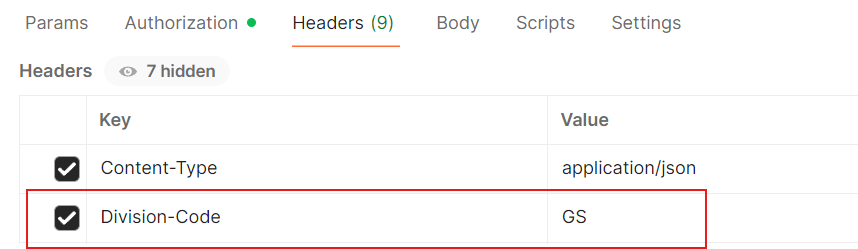
An optional header called "Division-Code" exists where you can include the Division code. This will ensure the correct results are returned for the API users when using Divisions.

The API user account must have been given user access to the division to be able to successfully pass it in the API call. If not, you will receive an error message.

e.g. Division-Code : GS

Using Postman:&#x20;

<figure><img src="/files/DN6RBiXBFZel0DYVNS6f" alt=""><figcaption></figcaption></figure>

This capability replicates the functionality when a user accesses the webapp with their default division,  who will see data filtered by their default Division.

Applicable only to sites that use the Division feature.


---

# Agent Instructions
This documentation is published with GitBook. GitBook is the documentation platform designed so that both humans and AI agents can read, navigate, and reason over technical content effectively. Learn more at gitbook.com.

## Querying This Documentation
If you need additional information that is not directly available in this page, you can query the documentation dynamically by asking a question.

Perform an HTTP GET request on the current page URL with the `ask` query parameter, and the optional `goal` query parameter:

```
GET https://knowledgebase.fabricdata.com/xytech/rest-api/query-parameters-and-filters.md?ask=<question>&goal=<endgoal>
```

`ask` is the immediate question: it should be specific, self-contained, and written in natural language.
`goal` is optional and describes the broader end goal you are ultimately trying to accomplish on behalf of the user. GitBook uses it to tailor the answer towards what is most useful for that goal.

The response will contain a direct answer to the question and relevant excerpts and sources from the documentation.

Use this mechanism when the answer is not explicitly present in the current page, you need clarification or additional context, or you want to retrieve related documentation sections.
